GyroBall brings classic wooden labyrinth precision to your Android device. Guide the steel ball past dark trap holes using smooth Gyroscope tilt physics or Touch/Keyboard controls—and unleash your creativity with a full Built-in Maze Level Builder.
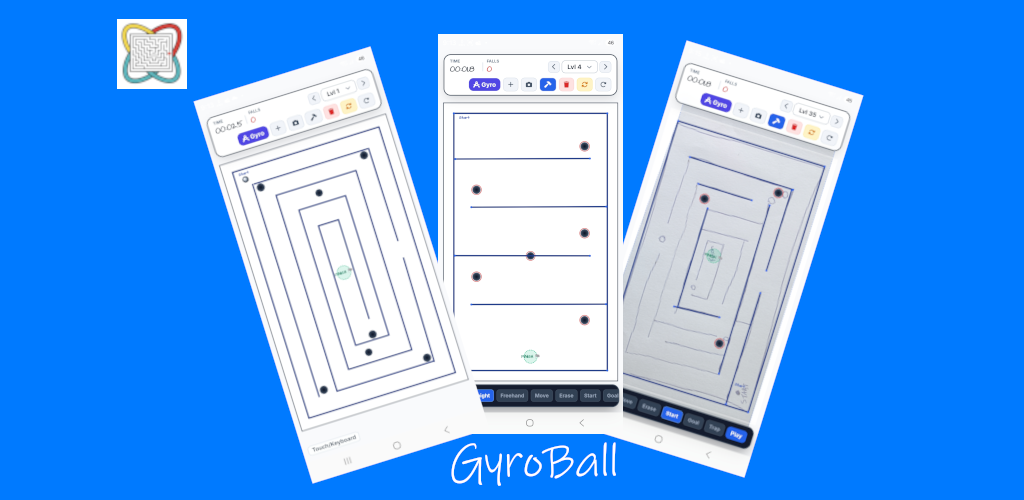
See how responsive tilt controls guide the ball through tight corridors—and watch how quickly you can draw your own custom mazes from scratch.
shoppingapp_video/GyroBall.mp4
Whether you're chasing speedrun records on built-in stages or sketching your own tricky obstacle course, GyroBall puts total control in your hands.
Tilt your phone naturally to roll the ball with realistic momentum, wall bounces, and gravity response. Every subtle wrist movement translates directly onto the board.
Playing on a tablet, Chromebook, or sitting in a moving vehicle? Switch seamlessly between Gyro tilt mode and Touch/Keyboard controls with a single tap.
Design your own levels right inside the app! Draw crisp Straight walls or organic Freehand paths, place Start points, Goals, and deadly Traps, then tap Play to test immediately.
Progress from clean geometric spiral labyrinths in Level 1 to intricate hand-drawn sketch mazes and multi-trap gauntlets in Level 35 and beyond.
Every millisecond counts. Track your live completion time down to the tenth of a second alongside your Falls counter to master clean, zero-fall runs.
Jump between any unlocked or custom stage using the top level selector (< Lvl 1 >), move or erase elements effortlessly, and reset in one tap.
Tap any phone screen to inspect full-size details. Linked directly to your Screen_shot/ folder.
GyroBall isn't just a maze game—it's a full tactile puzzle workshop. Switch into Build Mode on any stage or create a brand-new hand-drawn labyrinth from scratch using intuitive tools right at your fingertips:
Download GyroBall free on the Google Play Store or scan the QR code with your phone's camera to jump straight into Level 1.